Nearby clipped samples are grouped into events with timestamps, so you can move directly to the affected passage.
Audio clipping detector
Audio Clipping Detector: Find Clipped Samples Online
Load an audio file to check whether decoded samples reach the digital ceiling. Review grouped timestamps and Sample Peak, then confirm each event by listening—without uploading the recording.
No server uploadListen before decidingMethod and limits stated
LOCAL AUDIO CHECK
Check a recording for digital clipping
The detector scans decoded samples for full-scale hits, groups nearby hits into events, and lets you listen at each timestamp.
100% private · runs in this browser
Choose an audio file
WAV, MP3, FLAC, M4A, or OGG · up to 100 MB
No account required. Your recording never leaves this device.What the check answers
A ceiling hit is a location to inspect—not the whole diagnosis.
Stored sample values and reconstructed inter-sample peaks describe related but different risks.
Use the timestamp as a starting point, then judge duration, repetition, waveform shape, and audibility.
How to check a file
From upload to a defensible conclusion.
- 01Load the exported file
Analyze the actual WAV, MP3, FLAC, M4A, or OGG file you intend to deliver—not only the live mix before export.
- 02Let complete-file diagnostics finish
Review Sample Peak, reconstructed True Peak, clipped-sample count, and grouped event timestamps together.
- 03Select every reported event
Jump to the marked passage and listen just before and after it. Repeated flat peaks are more meaningful than one isolated ceiling sample.
- 04Correct the earliest overloaded stage
Check microphone placement, preamp gain, plug-ins, buses, limiters, and export gain. Turning down an already-clipped file does not restore it.
Real recording · controlled comparison
One whistle, three gain conditions.
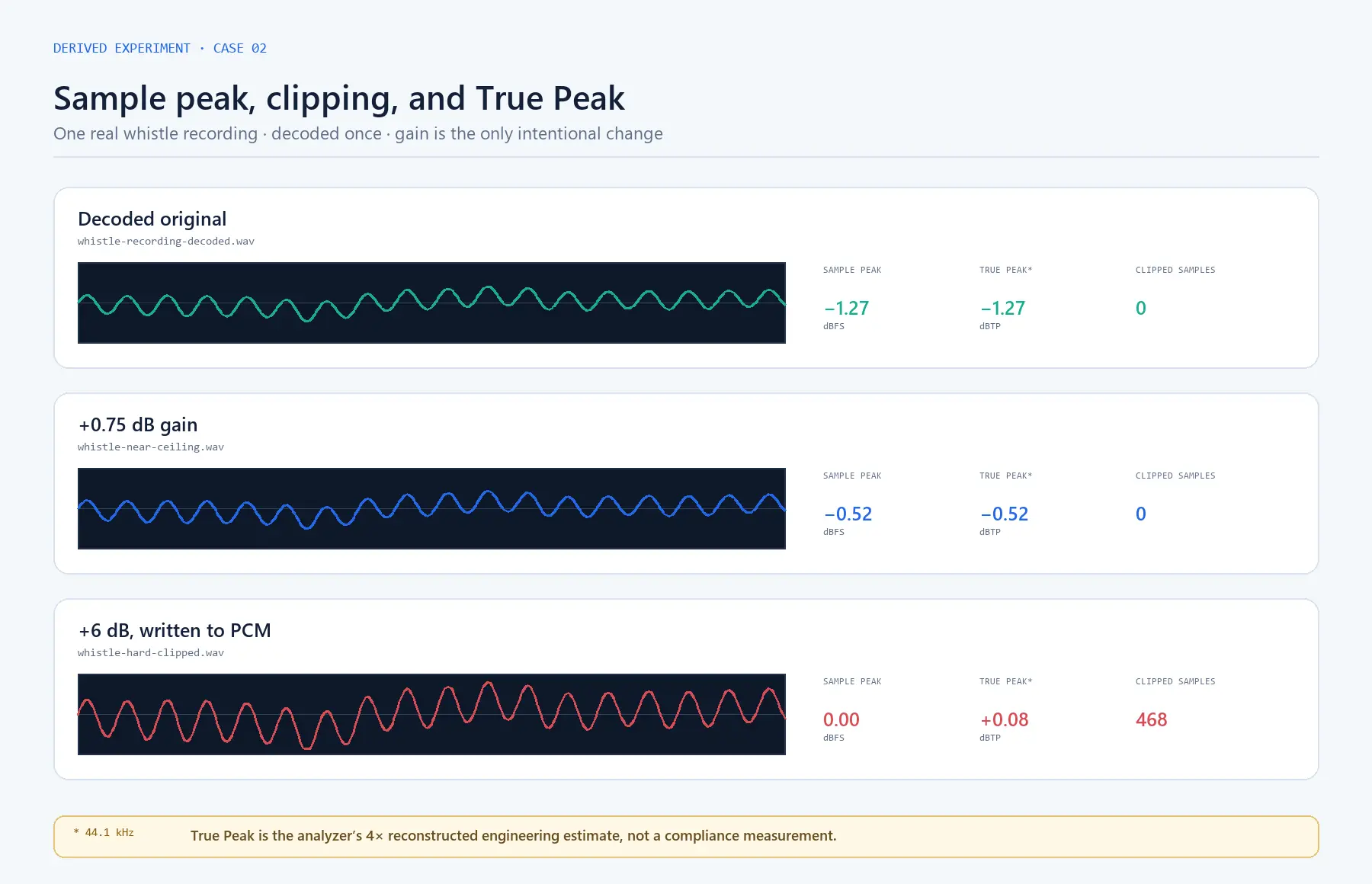
The source is a 12.98-second mono phone recording at 44.1 kHz. The second copy was raised by 0.75 dB. The third was raised by 6 dB and written to PCM, deliberately producing hard clipping.
Peak: −1.27 dBFS · clipped samples: 0
Peak: −0.52 dBFS · clipped samples: 0
Peak: 0.00 dBFS · 468 clipped samples
| File | Sample Peak | True Peak | Clipped samples |
|---|---|---|---|
| Original | −1.27 dBFS | −1.27 dBTP | 0 |
| +0.75 dB | −0.52 dBFS | −0.52 dBTP | 0 |
| Hard clipped (+6 dB) | 0.00 dBFS | +0.08 dBTP | 468 |
Read the complete procedure, timestamps, and downloadable result data in the clipping and True Peak experiment.
Method and limits
What the detector can—and cannot—establish.
Sample clipping is flagged when decoded sample magnitude reaches the analyzer’s stated threshold. Events group nearby affected samples into useful timeline positions.
True Peak is a reconstructed engineering measurement. At 48 kHz the analyzer uses the documented 4× method; other sample rates are explicitly labelled as estimates.
No warning is not proof of an undamaged chain. An analogue input or previous encode may have distorted before the resulting samples were brought below full scale.
Read the full measurement methodologyCommon questions
Clipping detection, without shortcuts.
Can audio clip below 0 dBFS?
Stored samples below 0 dBFS are not sample-clipped at that measurement point. However, distortion may have occurred earlier in the recording chain, and reconstructed True Peak can exceed the highest stored sample.
Does one sample at 0 dBFS prove audible damage?
It is evidence worth inspecting, not an automatic verdict. Audibility depends on how many samples are affected, how events repeat, and the surrounding material.
Can lowering the volume repair clipping?
No. Lowering playback level reduces the level of the damaged signal but does not restore waveform information lost during hard clipping.
Private browser analysis
Run the clipping checkInspect your own recording.
Load an audio file, review the visual evidence, and confirm important passages by listening.